 How to open ISO files?
An ISO image is an image of files that can be burnt to a CD. Before burning it off on a CD, you can follow the instructions below to open the ISO file and edit its contents. There are quite a lot of programs to open ISO files.
Open ISO file with WinRAR
Step 1
Get your copy of WinRAR. Double click on the setup file and the installation proceeds.
Step 2
During the setup process, WinRAR will ask you to set file associations, make sure that ISO is checked. Click Done in the next window.

Step 3
Now, navigate to the folder where your ISO file is present. Notice that there’s a WinRAR icon indicating the ISO file.

Step 4
Double click to open the ISO file.
Step 5
WinRAR opens and the contents of the file are displayed.
Open ISO file with Daemon Tools
Step 1
Download Daemon Tools and intall it on your computer.
Step 2
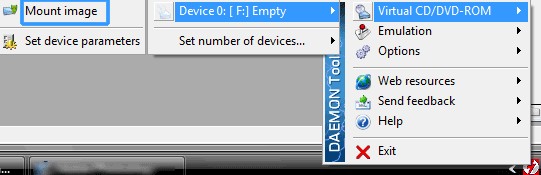
Right Click the DAEMON Tools icon in the system tray.
Step 3
From the Vitual CD/DVD ROM option, set the number of drives to 1.

Step 4
You should be able to see a new DVD drive in My Computer! Now you need to mount the ISO file.
Step 5
Again right click on DAEMON Tools choose Virtual CD/DVD ROM > Device > Mount Image.

Step 6
Now go to My Computer, you should be the new drive with a CD/DVD loaded in it.
Step 7
Install or copy whatever you need from it. You can unmount the drive after use.